Sharing a GPU Without Sharing Your Data: Passthrough, vGPU and MIG Compared
GPU sharing is a three-way trade between isolation, utilization and operability. A buyer's comparison of passthrough, time-sliced vGPU and MIG, what happens on patch night, and six questions to ask any platform.
GPU sharing is a three-way trade between isolation, utilization and operability, and most platform pitches only discuss the first two. The third is where teams get surprised: what happens to a GPU workload when you need to patch the host.
As private models and agents move onto shared hardware, one expensive GPU serving several teams is increasingly common. I spent about eight years selling VMware and Broadcom infrastructure, so I write this from the buyer's side of the table: what to ask, what to check, and where the documentation stops. This article compares the three main ways to share a GPU, and the questions that separate them.
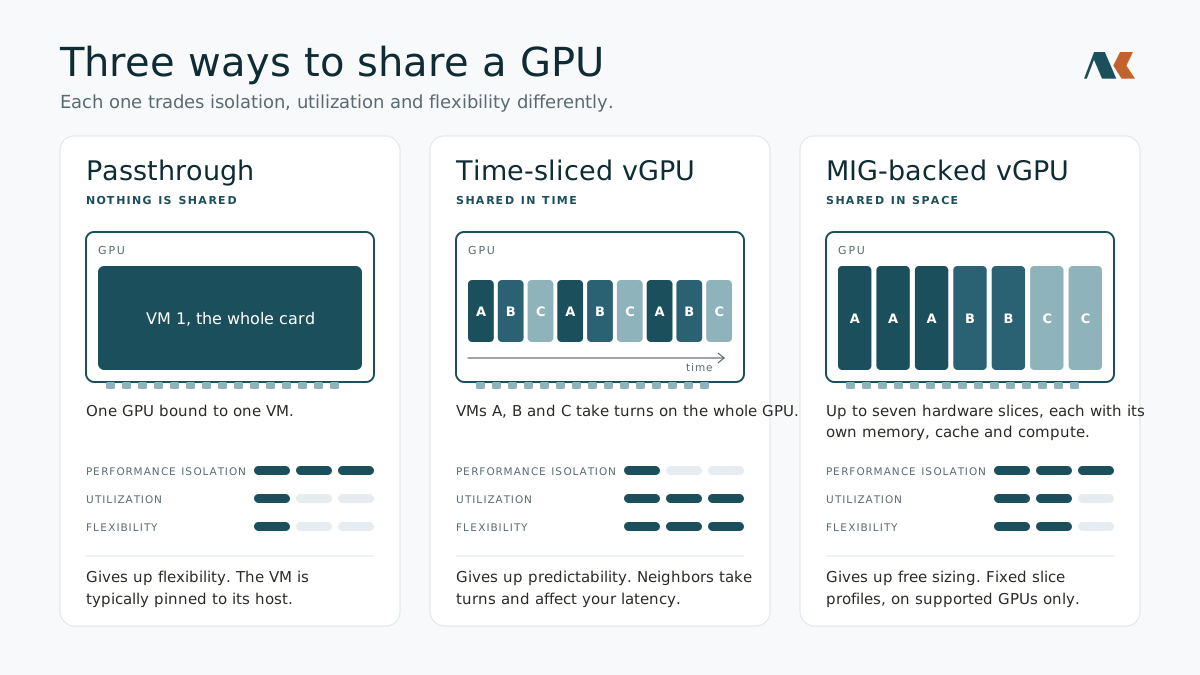
Three ways to share a GPU
| Method | What is shared | Isolation | Operations impact |
|---|---|---|---|
| Passthrough | Nothing. One GPU is bound to one VM | Strongest and simplest | Device state lives in the card, so the VM is typically pinned to its host |
| Time-sliced vGPU | The whole GPU, multiplexed in time | Memory is isolated by the IOMMU; performance isolation is temporal, so neighbors affect your latency | Live migration is supported on current vSphere and KVM releases, but GPU memory has to be copied |
| MIG-backed (Multi-Instance GPU) | Hardware slices, up to seven per GPU | Spatial: each slice has its own memory, cache and compute, with fault isolation and predictable throughput | Predefined slice profiles; one MIG slice per VM, and a GPU runs MIG or time-sliced profiles, not both. Supported GPUs only: NVIDIA lists Ampere, Hopper and Blackwell, while Broadcom's VCF 9.1 design guide lists Ampere and Hopper |
NVIDIA's own documentation draws the line clearly. Time-sliced vGPUs take turns on the full GPU, so processes run in series. MIG-backed vGPUs get dedicated hardware partitions and run in true parallel, which is why NVIDIA recommends them for multi-tenant work and consistent latency.
One caution on the table: "isolation" there means two different things, and they fail in different ways.
Isolation is two questions: performance and data
Performance isolation asks whether a noisy neighbor can hurt your latency. Time-slicing says yes, by design. MIG says no, because the resources are physically divided. For inference with latency targets, this is usually the deciding factor.
Data isolation asks whether one tenant can read another's leftovers. This is the one people assume and rarely test. The LeftoverLocals vulnerability (CVE-2023-4969), disclosed by Trail of Bits in January 2024, showed that on affected AMD, Apple, Qualcomm and Imagination GPUs one process could read data a previous process left in GPU local memory, including pieces of another user's LLM session. The researchers reported that NVIDIA and Arm devices were not affected.
The lesson is not about any one vendor. Their paper notes that conservative partitioning approaches such as vGPU physically divide the GPU and so probably avoid this class of leak, but they say they lack conclusive evidence. Meanwhile, simply sharing a GPU through ordinary multi-process scheduling was enough to expose the problem, including inside containers.
Whether memory is cleared between tenants, and by what mechanism, is a property you have to ask about, not assume.
The part nobody budgets: operations
A VM with a GPU attached carries a lot of state. To live-migrate it, the platform has to copy the GPU's memory too, and the VM is paused for the final switchover.
This used to be a serious operational problem, and it shows why vendor claims need dates. On vSphere 7 and on 8.0 before Update 2, DRS did not automatically move vGPU VMs off a host entering maintenance mode, because the pause could exceed 100 seconds, so administrators moved them by hand. vSphere 8.0 Update 2 let DRS estimate the pause and automate the move when it falls under a configurable limit, 100 seconds by default, once an administrator turns that automation on. It is still opt-in on VCF 9.1: Broadcom's 9.1 design guide says DRS leaves vGPU VMs to manual remediation by default, and moves them automatically for load balancing or maintenance only when the PassthroughDrsAutomation setting is enabled.
VMware Cloud Foundation 9.0 (June 2025) changed the picture. Broadcom reworked how vMotion copies the vGPU checkpoint, replacing a single-threaded channel with a multi-threaded one. Broadcom's VCF 9.0 release notes and 9.1 design guide explain the rest: from ESX 9.0, vMotion tells static GPU memory from memory that is changing. The static part, which Broadcom puts at about 70% for LLM inference and which is mostly model weights, is copied while the VM keeps running; only the changing data, such as the KV cache, is copied during the pause. Broadcom reports pauses three to four times shorter than vSphere 8.0 Update 3. In its tests, a VM with eight 80 GB H100 GPUs paused for 21 seconds, a configuration that hit the 100-second default limit on 8.0 Update 3. Broadcom now calls vMotion practical for 48 GB, 80 GB and larger vGPU profiles.
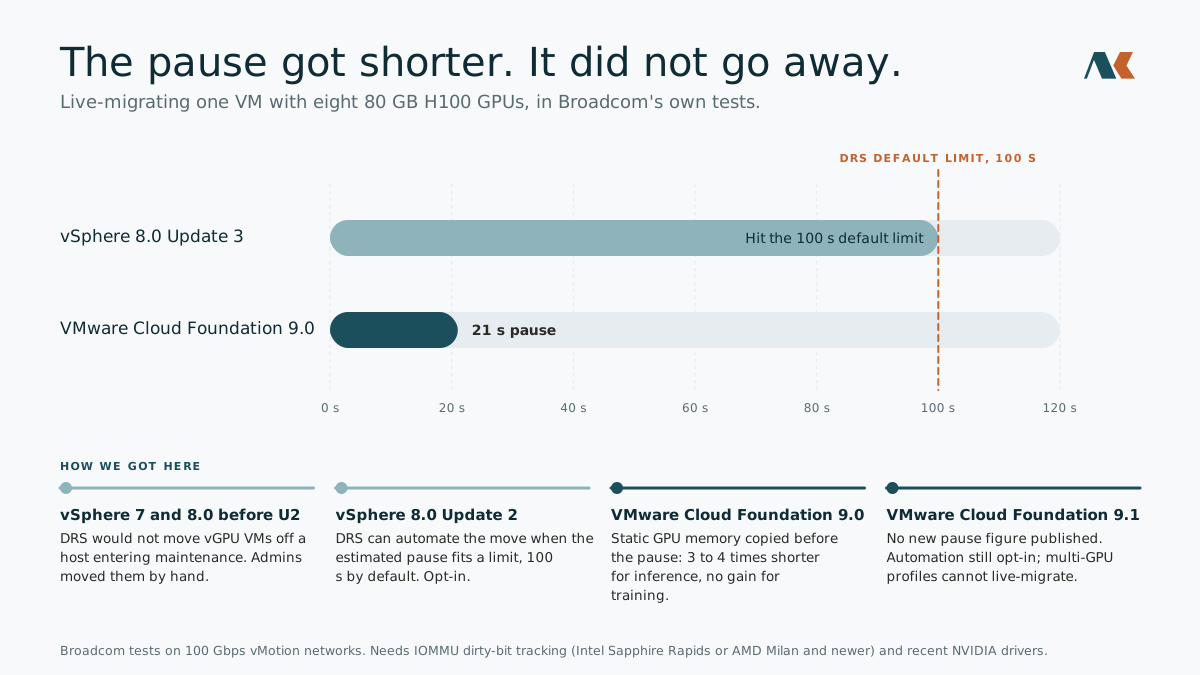
Read those results with their conditions. They are Broadcom's own tests on 100 Gbps vMotion networks, and the gains depend on IOMMU dirty-bit tracking, which needs Intel Sapphire Rapids or newer, or AMD Milan or newer, along with recent NVIDIA driver generations. The pause still exists; it is shorter. Any platform that live-migrates a GPU-attached VM has to move the GPU's memory, so the useful questions are about conditions: which CPUs, which network, which drivers, and how long a pause your workload tolerates.
VCF 9.1 has not published a shorter pause. Broadcom's vSphere 9.1 FAQ lists "faster vMotion for GPU workloads" among the release's highlights, but neither the 9.1 release notes nor the 9.1 design guide gives a new figure or a new mechanism for vGPU. What 9.1 adds is an estimate of vMotion downtime in vCenter for VMs with Enhanced DirectPath devices. The design guide carries the ESX 9.0 mechanism and the same 100-second default, and two caveats apply. Broadcom's 9.0 release notes say the pre-copy helps generative AI inference but has no impact on graphics and training workloads. And VMs that use Unified Virtual Memory, which multi-GPU profiles require, cannot be live-migrated at all and have to be powered off for maintenance.
For stateless inference, often the better answer is evacuation by replacement: run replicas across hosts, drain one, and let the others absorb traffic. That turns host maintenance from a migration problem into a scheduling problem. It is a design choice, not a guarantee, and it works best when slices are sized so any replica can take over.
VCF 9.1 helps with the drain itself, for every VM and not only GPU ones. A new maintenance-mode option evacuates VMs only when the remaining hosts can absorb their demand, and DRS may rebalance those hosts first. vMotion tasks also start as each one finishes, instead of waiting for a batch of eight to complete.
The stack underneath
NVIDIA vGPU is not a hypervisor feature on its own. It is a layered stack: a vendor host driver installed on the hypervisor, a matching driver inside each guest, and a licensing service the guests must reach. Running AI on vGPU requires an NVIDIA AI Enterprise license, whichever hypervisor you use.
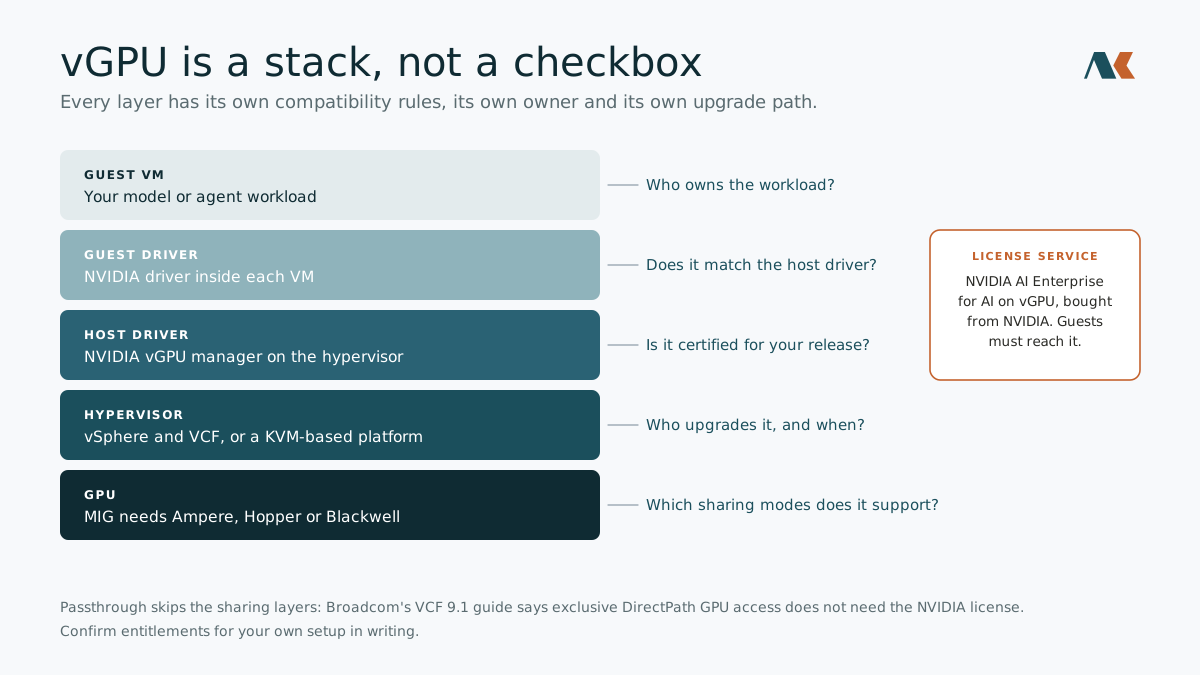
On VMware Cloud Foundation, the entitlements have been shifting. Broadcom announced at VMware Explore 2025 that Private AI Foundation with NVIDIA moved into the standard VCF subscription, although some Broadcom documentation still refers to a separate add-on license, so confirm your entitlements in writing. The NVIDIA AI Enterprise license is still bought from NVIDIA, not Broadcom. Broadcom's VCF 9.1 guide says exclusive GPU access through DirectPath passthrough does not require the NVIDIA license, which matches NVIDIA's own hypervisor certification documentation.
Each layer has its own compatibility rules. Broadcom's requirements page says the NVIDIA host driver must be compatible with your VCF version, and the faster vMotion described above relies on newer driver generations. That is routine, and it is why GPU sharing should be evaluated as a stack with owners and upgrade paths, not as a checkbox. The same applies on KVM-based platforms, where each vendor integrates NVIDIA's generic KVM vGPU release.
Six questions to ask any platform
- Is isolation temporal or spatial? Will a neighbor's job change my latency?
- What is cleared between tenants, and who checks it? Ask for the mechanism, not the assurance.
- How do I drain a GPU host for maintenance? What happens to running workloads, and how long are they paused?
- What does the sharing stack depend on? Which components, which licenses, and who patches each one?
- Can I resize partitions without a maintenance window? MIG instances can be reconfigured, but check what the platform allows while workloads run.
- Can I attribute GPU usage per tenant? Chargeback and capacity planning need it.
The takeaway
Choosing a GPU-sharing mode is a choice about failure: whose latency suffers, whose data could leak, and what happens on patch night.
Passthrough maximizes isolation and gives up flexibility. Time-slicing maximizes utilization and gives up predictability. MIG-style partitioning gives predictable, isolated slices at the cost of fixed sizes and supported hardware.
Whichever you pick, evaluate the whole stack and the operations around it. The platform that answers the six questions plainly is usually the one that has already hit the problems behind them.
Frequently asked questions
What is a vGPU? It is software that lets several virtual machines share one physical GPU. Each machine sees its own virtual GPU, and the host driver decides how much of the real card each one gets.
What is MIG? Multi-Instance GPU is an NVIDIA feature that cuts a supported GPU into as many as seven separate pieces in hardware. Each piece has its own memory and compute, so one tenant's workload cannot slow down another's.
What is the difference between passthrough and vGPU? Passthrough gives one virtual machine the whole GPU, so nothing is shared. vGPU splits one GPU among several machines, which uses the card more fully but adds sharing rules to manage.
Can another tenant see my data on a shared GPU? It depends on how the GPU is shared and how memory is cleared between users. A 2024 flaw called LeftoverLocals let one process read data left behind by another on some AMD, Apple, Qualcomm and Imagination GPUs. That is why the question to ask is what gets cleared and who checks it.
What is live migration, and why does a GPU make it harder? Live migration moves a running virtual machine to another server without shutting it down. With a GPU attached, the platform also has to copy the GPU's memory, so the machine is paused for a short time at the end. Newer releases shorten that pause, but it does not disappear, and VMs using multi-GPU profiles cannot be live-migrated at all.
Do I need a separate NVIDIA license? Running AI on vGPU requires an NVIDIA AI Enterprise license, which you buy from NVIDIA whatever hypervisor you use. Broadcom's VCF 9.1 guide says passthrough, where a VM gets a whole GPU, does not require it. Confirm the terms for your own setup in writing before you buy.
Cheick M Ouedraogo spent about eight years in enterprise technology sales, including VMware and Broadcom, before founding Aurakore, where he builds virtualization and private AI infrastructure. He writes about what buyers should ask and what the documentation actually says.
Sources
- NVIDIA vGPU Types Reference, NVIDIA AI Enterprise documentation
- NVIDIA vGPU for Compute, NVIDIA AI Enterprise documentation
- NVIDIA Virtual GPU Knowledge Base: vGPU features across hypervisors, NVIDIA
- NVIDIA Multi-Instance GPU, NVIDIA
- Enhanced vMotion for vGPU VMs in VMware Cloud Foundation 9.0, Broadcom VCF blog, June 2025
- New Tuning Settings for DRS and vMotion for VMs with Virtual GPUs in vSphere 8.0 Update 2, Broadcom VCF blog, Sept 2023
- vSphere Lifecycle Manager is unable to place a host into maintenance mode if it has a running vGPU Virtual Machine, Broadcom knowledge base
- Requirements for Deploying VMware Private AI Foundation with NVIDIA, Broadcom TechDocs
- VMware Private AI Foundation with NVIDIA 9.1, Broadcom TechDocs
- LeftoverLocals: Listening to LLM Responses Through Leaked GPU Local Memory, Trail of Bits
- AMD, Apple, Qualcomm, Imagination GPUs could leak AI secrets via LeftoverLocals, SC Media
- Apple, AMD, Qualcomm GPU security hole lets miscreants snoop on AI training and chats, The Register
- Broadcom bundles private AI into VCF, adds security automation, Computer Weekly
- vGPU Compute Model, VMware Cloud Foundation 9.1 design guide, Broadcom TechDocs
- What's New: vSphere, VMware Cloud Foundation 9.0 release notes, Broadcom TechDocs
- What's New: vSphere, VMware Cloud Foundation 9.1 release notes, Broadcom TechDocs
- vSphere with VCF 9.1 General FAQ, VMware, May 2026
- What's New with vSphere in VMware Cloud Foundation 9.1, Broadcom VCF blog, May 2026
- NVIDIA-Certified Hypervisors, NVIDIA
This post is about Aurakore Virtualization.
See Aurakore Virtualization